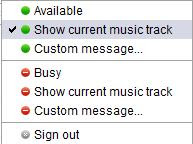
Recently, I was facing the minor issue on G-talk. About having trouble showing my online status to "Show My Current Music Track".
That may be because of my poor computer knowledge (especially VISTA is still very new to me). Then I searched online to solve this matter and I've found out the solution. For all sharing, here it is.........
1. If you have Google talk already installed, un-install it from Add/remove programs.
2. Download G-talk patch from web(Save the patch on your computer). Right click on the Google Talk installation file and select Run as Administrator. This will give you higher power (called elevation) to install Google Talk so that you will see all functionality.
3. Proceed with the installation.
4. Log-in to Google Talk and keep it running.5. Now open Media Player 11, (Please do not open Media Player 11 before logging in to Google Talk) Right click near Now Playing tab on the menu bar and select View.
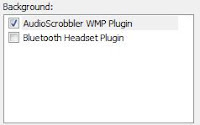
6. Click on Plug-ins and then Options. Click on backgrounds and if the Google Talk music plug-in is not checked please check it. If it is checked you need not worry. All is set up as expected.7. Click on Apply and Ok.8. Go to Google talk and set status message as Show current music track. Yup you are done. It is so simple. Hope this will work for all. And also hope that everyone has already know about this. But I want to share to those who still don't know.


